
Check NECO Results 2025: Complete Step-by-Step Guide for Internal and External Exams
Check NECO Results 2025. Follow our step-by-step guide to check your SSCE results online. Get your grades instantly today with our complete guide. Results is out.
How to Check NECO Results 2025/2026
The National Examinations Council (NECO) results are crucial for millions of Nigerian students pursuing their academic goals. Whether you are a candidate who sat for the Senior School Certificate Examination (SSCE) Internal or External, this comprehensive guide will walk you through the entire process of checking your NECO results for 2025.
NECO Internal vs External Examinations
Before we proceed to the result-checking process, it is crucial to know the difference between NECO Internal and External examinations:
NECO Internal Examinations serve students currently enrolled in secondary schools. Moreover, these students write their examinations in June/July within their school premises under the supervision of their teachers.
NECO External Examinations cater to private candidates, including those who have graduated from secondary school but wish to retake certain subjects or obtain better grades. Additionally, these examinations typically hold in November/December.
Read Also: NELFUND Students Loan & Scholarship 2025/2026: Step-by-Step Application Process & Requirements
When Are NECO Results Released?
NECO typically releases results within 45-60 days after the completion of examinations. For 2025:
- Authorities usually release internal examination results (June/July) between August and September
- Consequently, external examination results (November/December) typically become available between January and February of the following year
Furthermore, officials announce the exact release dates on NECO’s official website and through major news outlets.
Step-by-Step Guide to Check NECO Results 2025 Online
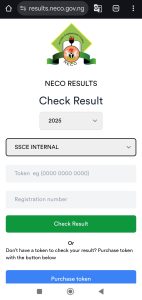
Method 1: Official NECO Website (Recommended)
Step 1: Visit the Official NECO Portal Navigate to the official NECO website at https://results.neco.gov.ng/
Step 2: Locate the Results Section Subsequently, look for the “Check Results” or “Results” tab on the homepage. Click on it to proceed to the results portal.
Step 3: Select Your Examination Type Next, choose between:
- SSCE Internal (for school candidates)
- SSCE External (for private candidates)
Step 4: Enter Your Details Then, provide the following information accurately:
- Examination number (as printed on your examination slip)
- Type of examination
- Year of examination (2025)
- Buy Exam pins
Step 5: Submit and View Results Afterward, click the “Submit” or “Check Results” button to view your results. Your system will display your grades on screen, showing subjects and corresponding grades.
Step 6: Print or Save Your Results Finally, use the print function to get a hard copy of your results or save them as a PDF for future reference.
How to Get NECO Results Checking PIN
NECO has largely eliminated the PIN requirement for result checking. Most candidates can now check their results directly using their examination number on the official portal (www.mynecoexams.com) without purchasing a PIN.
However, if a PIN is required:
Where to Buy NECO Result Checking PIN:
- Authorized banks (GTBank, First Bank, UBA, etc.)
- Licensed e-commerce platforms
- NECO-approved vendors
- Some telecommunications outlets such as Eazysaves.com
Cost: Typically ₦600-₦1,000 per PIN. Get your NECO results pin here
What You Need:
- Valid examination number
- Candidate’s full name
- Payment method (cash/card)
Important Note: Always verify if a PIN is actually required before purchasing, as NECO frequently updates their result checking system to be more accessible and PIN-free.
For the most current information, check the official NECO website or contact their helpline directly.
Method 2: SMS Result Checking
NECO also provides SMS services for result checking, though this method may have limitations regarding the amount of information displayed.
1. Format Your SMS First, send an SMS in this format: NECOExamNumberYear to the designated NECO SMS number (usually 32327)
2. Send the SMS Next, ensure you have sufficient airtime and send the formatted message.
3. Receive Results Finally, you will receive your results back to your phone via SMS, typically within minutes.
Alternative Methods for Checking NECO Results 2025
Using NECO Mobile App
NECO has developed mobile applications that you can find on Google Play Store and Apple App Store. Furthermore, these apps provide convenient access to results checking services.
Steps:
- Download the official NECO app from your device’s app store
- Install and then open the application
- Navigate to the results section
- Subsequently, enter your examination details
- Finally, submit to view results
Through Authorized Result Checking Centers
For candidates without internet access, NECO authorizes certain centers (usually cybercafés and educational institutions) to provide result checking services.
What to bring:
- Your examination slip or number
- Valid identification
- Additionally, bring a small fee for the service (if applicable)
Common Issues and Troubleshooting
Result Not Found
If your result does not appear:
- First, verify your examination number is correct
- Then, ensure you have selected the right examination type (Internal/External)
- Additionally, confirm the examination year
- Finally, wait a few days and try again, as NECO releases results in batches
Website Loading Issues
- Initially, clear your browser cache and cookies
- Furthermore, try using a different browser
- Also, check your internet connection
- Moreover, try accessing the site during off-peak hours
Incorrect Grades Display
If you notice discrepancies in your results:
- Contact NECO directly through their official channels
- Alternatively, visit the nearest NECO state office
- Finally, follow the official complaints procedure
About Your NECO Grades
NECO uses a 9-point grading system:
- A1 (Excellent): 75-100%
- B2 (Very Good): 70-74%
- B3 (Good): 65-69%
- C4 (Credit): 60-64%
- C5 (Credit): 55-59%
- C6 (Credit): 50-54%
- D7 (Pass): 45-49%
- E8 (Pass): 40-44%
- F9 (Fail): 0-39%
Credits (C4-C6) and above are generally required for university admission and other higher education programs.
What to Do After Checking Your Results
If Satisfied with Results
- Print multiple copies of your result
- Use results for university applications, job applications, or further studies
- Keep original examination slip safe for verification purposes
If Unsatisfied with Results
- Consider requesting for re-marking (if available)
- Register for subsequent examinations to improve grades
- Explore alternative educational pathways
Important Tips for NECO Candidates
- Keep Your Examination Details Safe: Store your examination number and slip in multiple secure locations
- Be Patient: Results are released in batches, so don’t panic if yours isn’t immediately available
- Use Official Channels: Always check results through official NECO platforms to avoid scams
- Verify Information: Double-check all personal details before submitting result checking requests
- Save Digital Copies: Keep electronic copies of your results for easy access
Frequently Asked Questions (FAQs)
1. How much does it cost to check NECO results online?
Checking NECO results through the official website is typically free. However, SMS checking may incur standard SMS charges from your network provider. Some third-party platforms may charge fees, but it’s recommended to use official channels.
2. Can I check someone else’s NECO result with their examination number?
Yes, you can check anyone’s NECO result if you have their correct examination number and other required details. The results are not password-protected, but you should only do this with the candidate’s permission.
3. What should I do if my NECO result shows missing grades for subjects I wrote?
If your result shows missing grades, contact NECO immediately through their official helpline or visit the nearest NECO state office. This could be due to various reasons including undetected answer sheets or processing errors that can be rectified.
4. How long does it take for NECO results to be released after examinations?
NECO typically releases results within 45-60 days after the completion of examinations. Internal examination results are usually released faster than external examination results due to the smaller candidate pool and controlled examination environment.
5. Can I use my NECO result slip as proof of result if the online portal is down?
While the examination slip serves as proof that you wrote the examination, official results must be obtained from NECO’s authorized platforms. Keep printed copies of your online results as official documentation. Some institutions may accept examination slips temporarily but will require official results for final verification.
6. Is it possible to upgrade NECO results after they have been released?
Once NECO results are officially released, they cannot be upgraded through re-marking or re-scoring. However, candidates can register for subsequent examinations (either Internal or External) to retake subjects they wish to improve. The better grade from any examination session becomes your official grade for that subject.
7. Is the 2025 Results out?
Yes, the 2025 NECO Internal Results are now available!
Conclusion
If you follow the right procedures and use the official channels, checking your NECO results for 2025 should be simple. The techniques described in this guide will enable you to safely and effectively access your results, regardless of whether you are an internal or external candidate.
For the most accurate and current information, always use official NECO platforms, be patient during result release periods, and keep your exam details secure.
Give your NECO results the consideration and care they require because they represent a significant milestone in your academic career.
The official website for results check is here



One Comment